 vidsticker
How to make a Telegram sticker from an iPhone Live Photo
A Live Photo on your iPhone isn't just a photo — it's three seconds of motion around the shot. That's exactly how long a Telegram video sticker can be. Send the Live Photo to @vidsticker_bot and half a minute later you'll have a moving sticker in your pack, with Boomerang and Loop — like Bounce and Loop in the Photos app. Free, no apps to install.
What you get
The sticker moves the same way the Live Photo does when you press and hold it in Photos: a second and a half before the shot and a second and a half after. Telegram stickers have no sound, but the bot can also turn the same Live Photo into a round video message — with sound.
- As is — the whole clip, looping.
- Boomerang — forward and back, like the Bounce effect in Photos. No visible seam, no jump.
- Loop — the end blends smoothly into the start, a seamless loop like Loop in Photos.
- No background — a neural network cuts the background out and keeps the person, pet or object.
How to make a sticker from a Live Photo
- Open @vidsticker_bot and tap Start — once.
- Tap the paperclip 📎 in the message field and pick the Live Photo from your gallery.
- Turn Live on — this is the key step. By default Telegram sends a Live Photo as a regular photo: the label in
the top-left corner of the preview says Live is off. Tap it and choose Live, the first option, — the Live
animation turns on. Loop and Bounce work too, but it's easier to pick an effect later with the buttons under the
sticker. (The screenshots show Telegram in Russian; the menu is in the same place.)
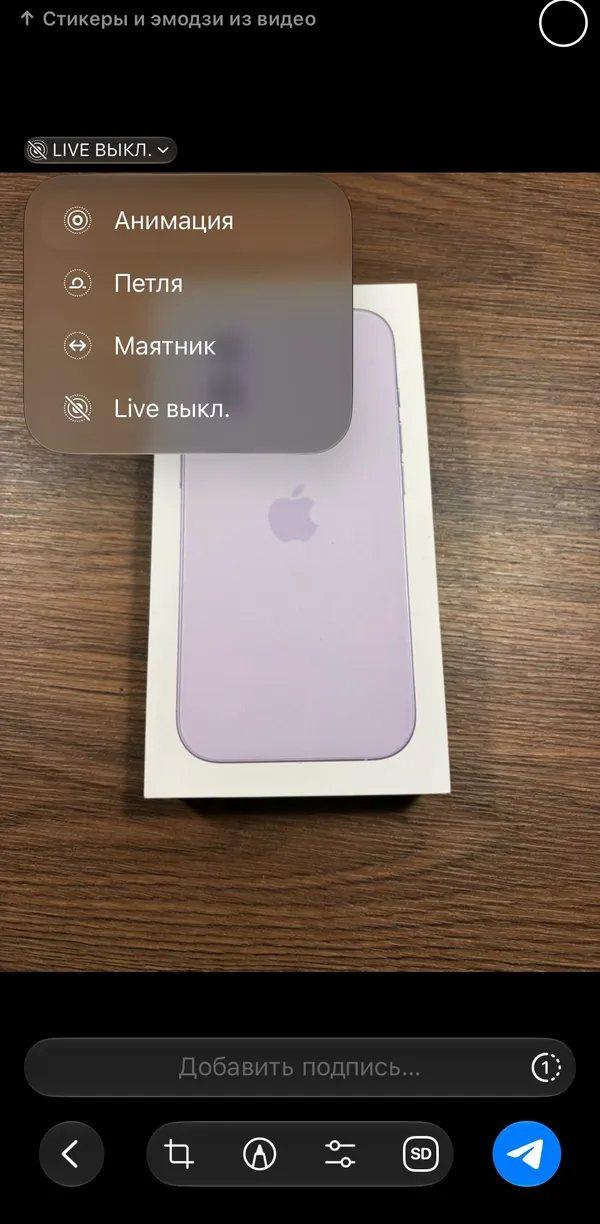
Tap the Live label in the top-left corner 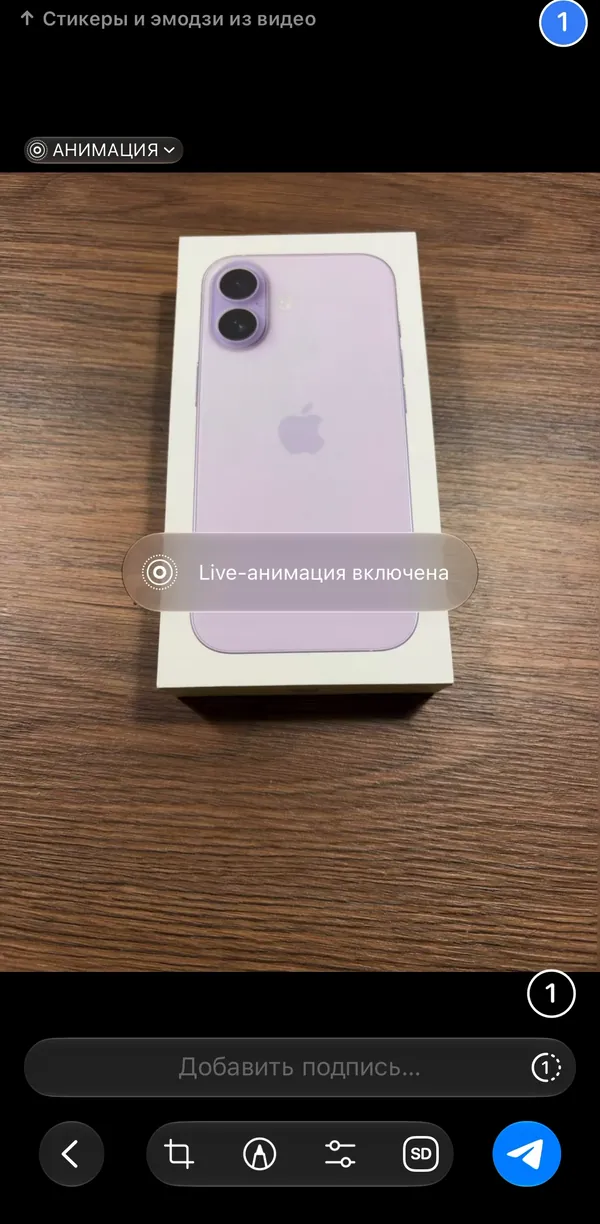
Live animation is on — ready to send - Send it. You can add wishes in the caption: “boomerang”, “loop”, “no bg”, “circle” or an emoji like 🔥.
- In 10–30 seconds the bot sends the sticker and adds it to your pack. Under the sticker there are buttons:
No effect ↔️ Boomerang 🔁 Loop, background
removal, shape, 😀 Video emoji and ⭕ Round video. Each tap rebuilds the
sticker and replaces it in your pack.
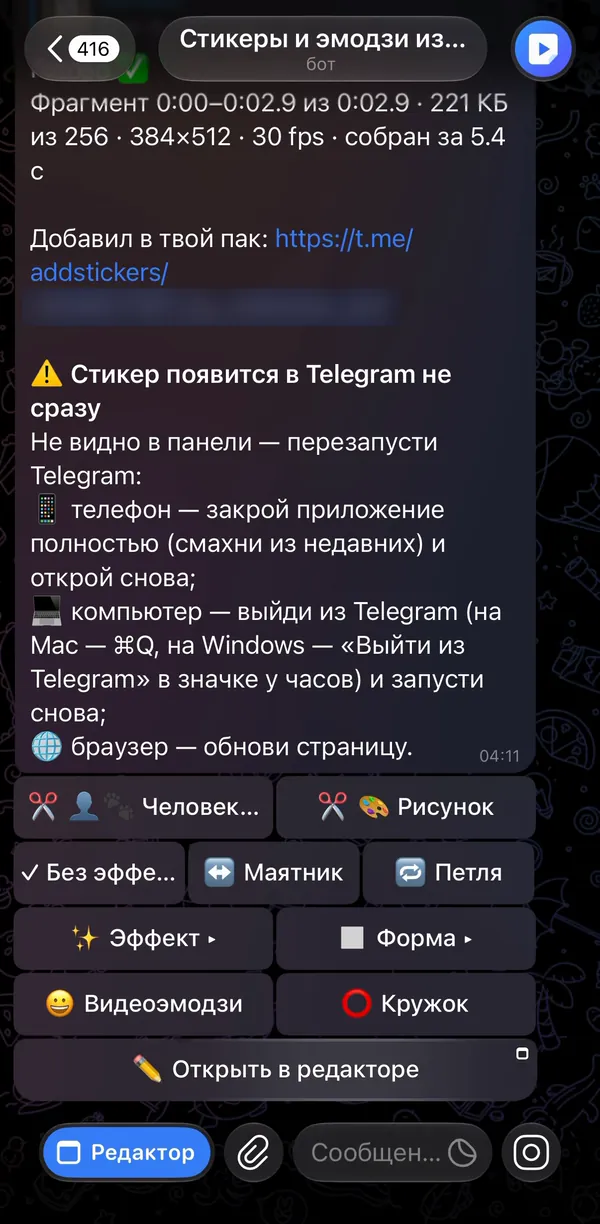
The bot's reply: the pack link and the buttons - Your first sticker creates a new pack: open the link in the bot's message (
t.me/addstickers/…) and tap “Add Stickers”. New stickers will land there automatically.
A new sticker doesn't show up in the panel right away: Telegram shows packs from its cache. Don't see it? Restart Telegram: close the app completely (swipe it away) and open it again.
If the sticker doesn't move
That means the bot got a regular photo without the clip. It happens in three cases:
- The Live Photo went out with Live off — that's Telegram's default. Send it again and pick Live in the top-left corner of the preview.
- An old version of Telegram. Telegram 12.6 and newer (April 2026) sends Live Photos with motion — update the app.
- The photo was uploaded on the website or in the mini app. The browser on an iPhone only gives a web page the still frame of a Live Photo, not the clip — that's how iOS works. The website notices it and tells you what to do (see below).
A fallback that always works: open the Live Photo in Photos, tap “…” → “Save as Video”, then send the clip to the bot or upload it on the website.
Live Photos on the website and in the mini app
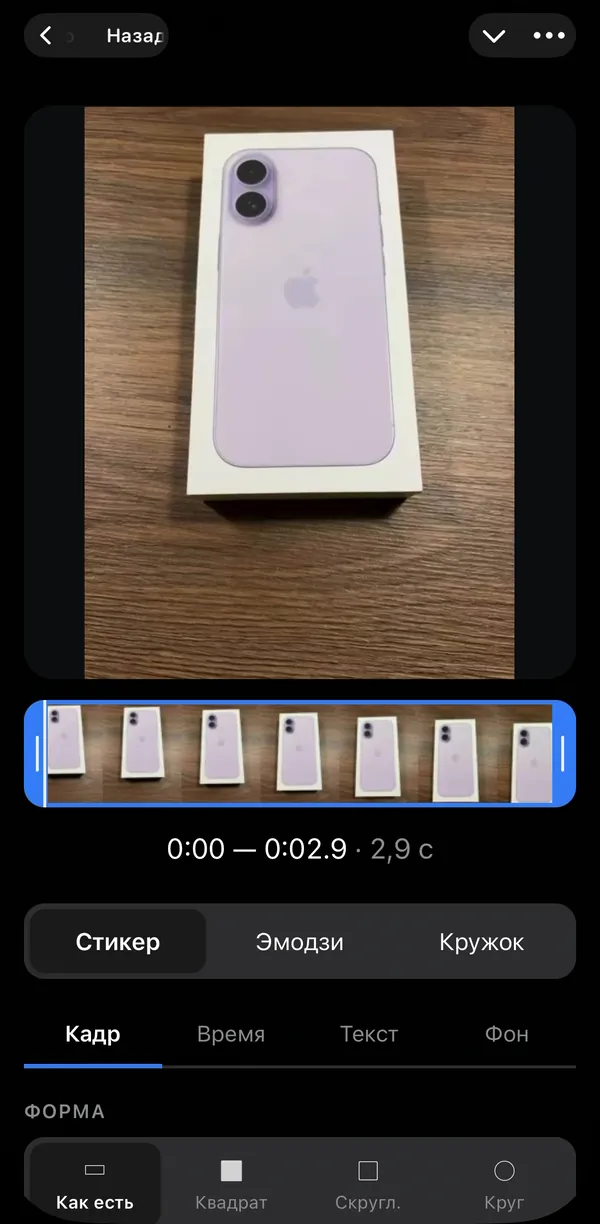
The online editor and the Telegram mini app can do things the chat can't: cropping with a frame, text on top, a frame strip. But a Live Photo picked in the browser arrives as a still image — it makes a regular sticker. The editor recognizes Live Photos and tells you how to make them move:
- Send the Live Photo to the bot as above — the bot gets it with motion.
- Under the sticker tap ✏️ Open in the editor. The editor opens with the Live Photo clip — crop it, add text and rebuild the sticker.
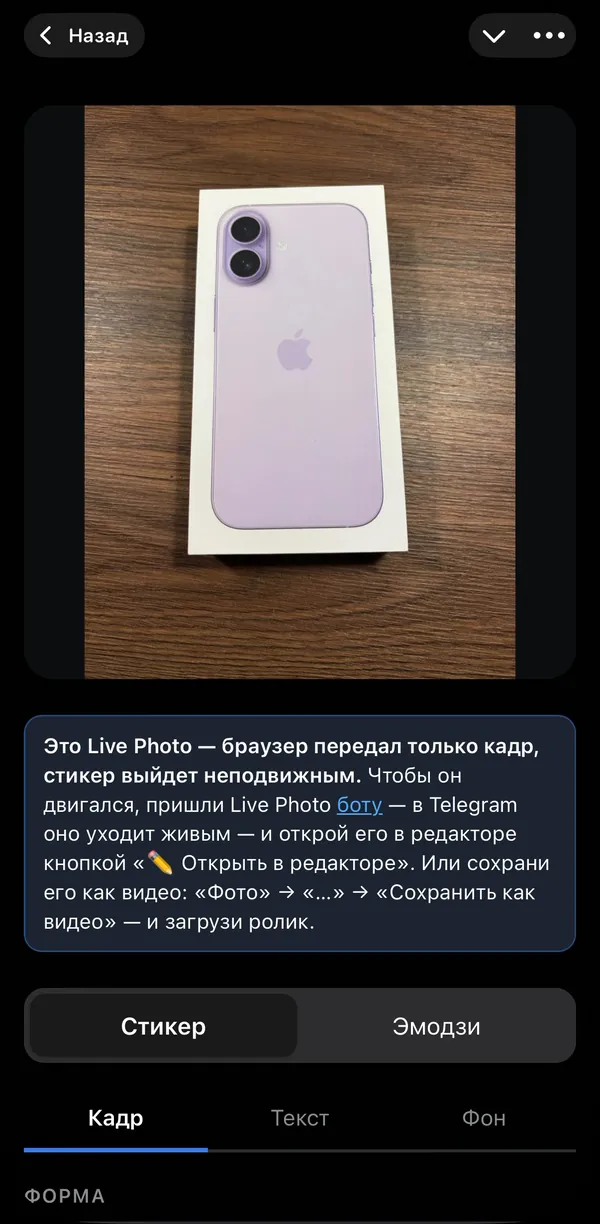
Android: motion photos
Samsung, Pixel and other Android phones have their own version — motion photos. Telegram 12.6 and newer sends them just like Live Photos, and the bot turns them into moving stickers the same way.
A Live Photo sticker right in the chat
A friend sent a Live Photo to a chat or group? Reply to it with “@vidsticker_bot” — the bot posts a sticker right there and adds it to your pack. Add wishes after the name: “@vidsticker_bot boomerang”. More in the guest mode guide.
Questions and answers
Is it free?
Yes. The bot makes stickers from Live Photos, videos and photos for free, with no channel subscriptions and no ads.
Will the sticker have sound?
No: Telegram stickers are silent. If you want sound, tap “⭕ Round video” under the sticker — the bot sends a round video message from the same Live Photo, with sound.
How long is a Live Photo sticker?
About three seconds — the whole Live Photo. A Telegram video sticker can be up to three seconds long, so nothing gets cut.
Why doesn't my sticker move?
The bot got a regular photo. Most often that's because Telegram sends Live Photos with Live off by default: in the preview, tap the label in the top-left corner and choose Live. Other reasons — Telegram older than 12.6, or the photo was picked on the website. A fallback: save the Live Photo as a video — Photos → “…” → “Save as Video”.
Can I remove the background from a Live Photo?
Yes. Tap the background removal button under the sticker or write “no bg” in the caption — the neural network keeps only the subject.
Can I make an emoji from a Live Photo?
Yes: the “😀 Video emoji” button under the sticker turns the same clip into a 100×100 video emoji and adds it to your emoji pack.
Does it work on Android?
Yes, with motion photos on Samsung, Pixel and other phones — on Telegram 12.6 or newer.